Per‑Character Text Animation

Google Summer of Code 2026 · Synfig Studio

A Text Group previously moved as one rigid block. This project gives every glyph inside it independent rotation, scale, and timing — and a mechanism for one glyph's animation to be shared with the rest, delayed, reordered, or reshuffled by a repeatable seed.

Independent glyphs

Each letter is its own layer with rotation, scale, and animation offset.

Shared animation

One glyph's animation can be reused across the whole word.

Delay & order

Choreograph forward, reverse, or random sequencing.

Random stagger

A repeatable seed reshuffles the sequence without touching the animation.

Studio integration

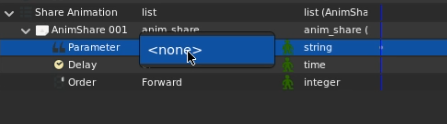
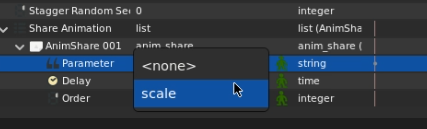
A dedicated parameter selector for choosing what to share.

Save & reload

Sharing configuration is part of the document, not a session setting.

Undo & redo

Sharing and unsharing route through Synfig's action system.

status — reviewed September 2026

Where the project actually stands

The feature is implemented as an end-to-end pipeline within Synfig. Layer_TextGroup converts shaped text into reusable Layer_GlyphShape layers, maintains glyph identity and layout, and manages shared animation relationships. AnimShare and ValueNode_AnimShareList store sharing configuration, while ValueNode_TimeOffset provides the per-glyph temporal offset used for staggered playback. Studio widgets and Synfig actions provide the editing and undo/redo interface, and the complete state is serialized with the canvas.

Repository & review state

Primary repository — XYuktaaa/synfig, branch GSoC26-text-animation, pull request #3742.

Types introduced or modified: Layer_TextGroup, Layer_GlyphShape, AnimShare, ValueNode_AnimShareList, and ValueNode_TimeOffset.

for users

Users Guide

A Text Group turns typed text into a managed set of glyph layers, each one still under the Text Group's direction. What follows is how to give those glyphs their own motion, and how to hand that motion to one another.

What is a Text Group?

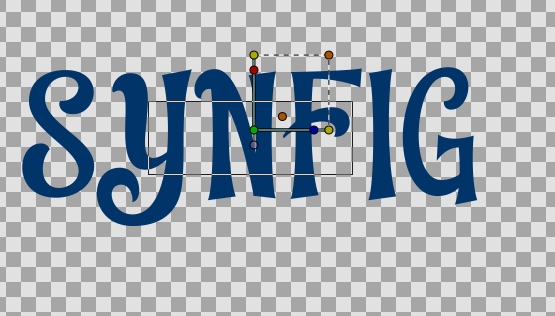
One text object becomes a managed collection of glyph layers, while a single Text Group parent still controls layout, font, and color. The glyphs live inside its subcanvas as implementation children — you don't create them directly, and they aren't meant to be treated as ordinary top‑level layers.

Making your first per‑character animation

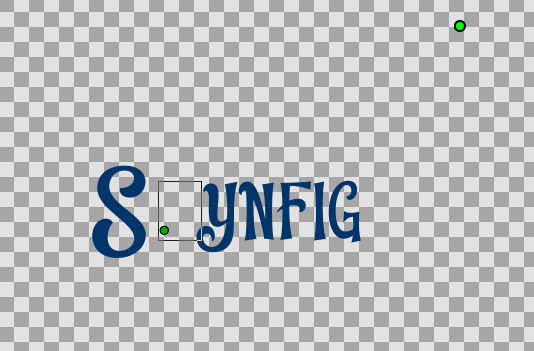
  1. Create the text. Add a Text Group, type HELLO, and set its font, weight, size, and layout as usual. The Text Group shapes the text and builds glyph layers in its internal subcanvas.
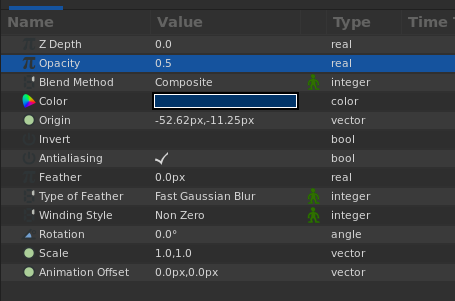
  2. Select a glyph. Select the source Glyph ie the first letter, the H — and animate its Scale from 1.0 up to 1.3 and back. Rotation, Scale, and Animation Offset are exposed as glyph‑level parameters. The Text Group's own origin stays separate and shouldn't be treated as a shared parameter.
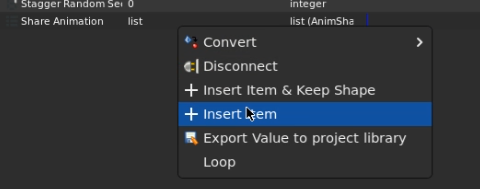
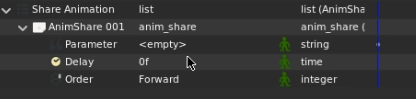
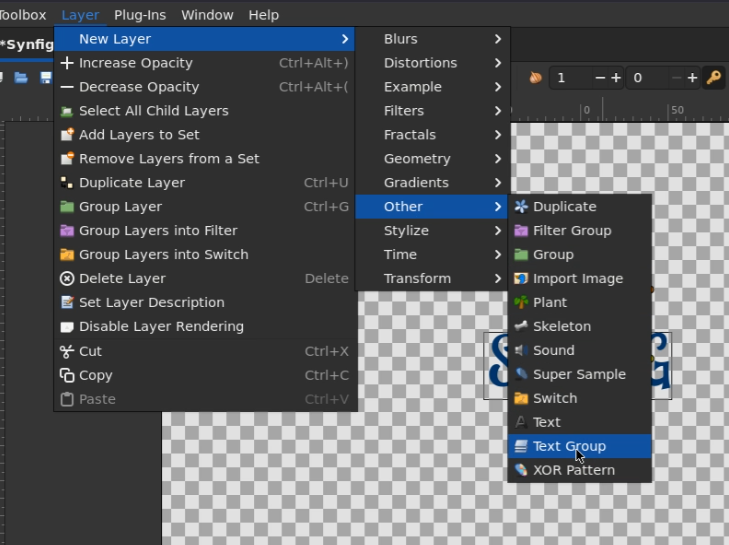
  3. Open Share Animation. In the Text Group's Share Animation list, add an entry and choose Scale from the parameter selector — the custom picker built for this purpose, so you're choosing a glyph parameter rather than hunting through value‑node internals.
  4. Set delay and order. Delay controls how far each glyph is shifted in time from the source animation; order decides which glyph gets the earliest part of it. Forward order moves E‑L‑L‑O in sequence after H.
  5. Preview, then save and reopen. Confirm the same list, delay, order, and resulting animation come back exactly as you left them.

one shared animation, five glyphs, each sampling it a little later than the last
Sharing an animation, in plain terms

A source animation lives on one glyph's parameter. When you share it, the Text Group resolves that animated value node and connects it — through a per‑glyph time wrapper — to the same parameter on other glyphs. Delay is how far apart each glyph samples it; order is who goes first. A positive delay should always mean a later glyph starts later, not earlier — a wave forming rather than every glyph twitching at once.

Order

Forward

Proceeds through the glyph sequence, first to last.

Reverse

Starts from the last glyph and moves backward.

Random

Uses the Text Group's stagger seed for a repeatable shuffle.

The seed changes the random ordering without touching the animation itself — a way to try several controlled variations of the same effect. Change the seed, and the order reshuffles; keep everything else the same.

Choosing a shareable parameter

In text Group animation, any glyph parameter that supports animation through waypoints can participate in a shared animation relationship. This includes properties such as Scale, Rotation, Opacity, Color, Z Depth, and other animatable parameters exposed by the glyph layer.

When a parameter is shared, one glyph provides the animation and the participating glyphs evaluate that animation through their own animation timing. The shared parameter therefore moves together as a coordinated animation, while each glyph can still have its own transform and timing context.

Origin is a special case. Origin should normally remain independent for each glyph. Sharing the same Origin would cause the glyphs to use the same coordinate, making the characters collapse onto a single position rather than retaining their individual layout.

The practical rule is simple: if a glyph parameter is animatable and can be represented by the value-node system, it can be considered a candidate for sharing. The exact parameters available depend on the glyph layer and the parameter editor.

Stagger recipes

Three practical starting points cover common reveal, pulse, and randomized-sequence effects.

Typing / Reveal

Source fade or scale‑in on the first glyph
Delay small, steady step
Order forward

Letters appear left to right, like a typewriter finding its rhythm.

Pulse / Wave

Source scale up and down, looping
Delay moderate
Order forward

A ripple moves through the word, rather than a single beat.

Deterministic Random Order

Source rotation or scale
Delay your choice
Order random, with a seed

Unpredictable, but repeatable — change the seed to reshuffle it entirely.

Editing and undo

Adding, editing, or removing a sharing entry is handled through Synfig's action system. These operations therefore participate in Synfig's normal undo/redo mechanism, including creation and removal of the first sharing entry in a Text Group.

When a sharing relationship is removed, glyphs that already had their own animation before sharing can have that original animation restored. A glyph that had no animation before sharing has no independent animation to restore; its parameter state is instead reconstructed from the current sharing state at the time of the operation.

For the most predictable unshare/undo result: perform the operation at frame 0, where possible. This is especially useful for glyphs that did not have an animation before sharing. If the intended initial state occurs at another frame—for example, an animation whose initial opacity is 0 but reaches opacity 1 later— perform the operation at the frame representing the state you want to preserve.

In other words, an existing per-glyph animation has something concrete to restore, while a previously static glyph must derive its state from the point in time at which the sharing relationship is removed.

Timeline advice

Stagger adds time to the sequence. If the source animation lasts T and there are N glyphs with a per‑step delay of d, the last glyph can need roughly T + (N−1)d to finish. Leave enough timeline after the source animation for the whole staggered sequence to land — the final letter is often still moving after the first one has stopped.

how it fits together

Architecture

Five high-level views explain the system from authoring through persistence; the implementation workflows below trace the concrete paths through Layer_TextGroup.

1 · Authoring

How an User's action becomes a structural change.

User Text Group Share Animation list Studio editor
Why it existsGives users a guided path to choosing what's shared, instead of editing value nodes directly.
Owned byStudio widgets & Layer_TextGroup
Failure modesSelector shows unrelated parameters if not filtered to shareable ones.

2 · Text conversion

Turning a string into shapes.

Text string Shaping / layout Glyph contour chunks GlyphShape layers
Why it existsSeparates text decomposition from layer synchronization, and from Layer_Freetype.
Owned bytext_processing.cpp/.h, using HarfBuzz/FreeType, UTF‑8 aware
Important fileslyr_textgroup.cpp, text_processing.cpp
Failure modesByte‑oriented iteration breaks multibyte scripts — flagged and fixed early; only claim script coverage that's actually been tested.

3 · Shared animation

One glyph's motion, sampled by many.

Source glyph parameter Exported persistent node TimeOffset wrapper (per glyph) Glyph parameter
Why it existsWithout a per‑glyph time shift, every glyph would sample the exact same instant — motion in unison, not in sequence.
Owned byValueNode_AnimShareList, ValueNode_TimeOffset
Failure modesWrapper cache reused when it shouldn't be if the underlying shared node changed; Vector/Composite inversion for Animation Offset needs focused verification.

4 · Update lifecycle

What runs when something changes.

Text/layout change sync_glyphs
Share‑list change rebuild_shared_entries resolve nodes attach wrappers
Unshare remove entry detach / restore original node
Why it existsGlyphs are reused where possible instead of destroyed and rebuilt — a full clear could erase hand‑made keyframes and connections.
Failure modesAn entry that disappears from the list but isn't explicitly detached leaves a glyph wired to a stale wrapper.

5 · Persistence

What survives a save and reload.

AnimShare list + exported nodes SIF serialization Load Reconstruct from structural list
Why it existsSharing must reconstruct identically regardless of which frame the document happened to be on when it was saved.
Failure modesReconstructing from a time‑evaluated list rather than the raw structural entries makes a share appear to vanish on some frames — a fixed bug, described below.

implementation workflows

What actually happens under the hood

These are the four paths that matter most when reading or maintaining Layer_TextGroup. They complement the high-level cards above rather than replacing them.

Workflow A · Text → glyph layers (sync_glyphs)

Text edits rebuild only what has to change.

load_font_static shape_text glyph contours + layout LCS identity match reuse / create GlyphShape

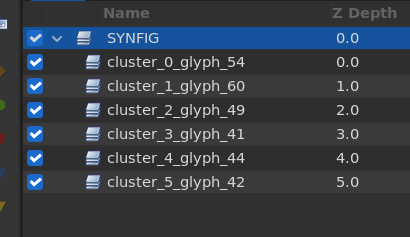
When text or font parameters change, sync_glyphs() loads the font, shapes the text (using HarfBuzz when available), converts each outline to contours, and computes glyph placement. The important preservation step is an LCS diff between old and new glyph identities: matching Layer_GlyphShape children are reused, so attached animation is not discarded just because the text changed. Glyph descriptions carry an identity key of the form cluster_<c>_glyph_<g>, which can be parsed back during synchronization.

Workflow B · Sharing + staggering

One source animation becomes many time-shifted samples.

Studio parameters AnimShare entry resolve source node shared_entries_ TimeOffset per glyph

The Studio editor records an AnimShare entry in the share_animations list. Each entry contains the selected glyph parameter, delay, and order. The source glyph's animated node is resolved and reused, while each participating glyph receives its own ValueNode_TimeOffset wrapper around that shared node.

For RANDOM order, rebuild_stagger_permutation() ranks glyphs from a hash of (cluster, glyph_index) mixed with a per-layer salt. Sorting those ranks produces stagger_perm_, so the order looks random but remains reproducible for the document.

Workflow C · Persistence and reconstruction

The relationship survives closing and reopening the document.

AnimShareList SIF serialization load raw structural list reattach sharing

Sharing metadata is stored as the structural ValueNode_AnimShareList. Each entry records the target parameter, delay, and order. On load or parameter change, the Text Group reconstructs sharing from the raw list rather than from a time-evaluated list, then reattaches the current set of relationships.

Workflow D · Runtime time evaluation (set_time_vfunc)

Staggering is evaluated as time, not duplicated keyframes.

group time Text Group offset / dilation base_time glyph layer TimeOffset sampling

set_time_vfunc() first applies the Text Group's own time dilation and offset, then propagates that base_time to glyph layers in the sub-canvas. The per-glyph ValueNode_TimeOffset wrappers shift sampling by the stagger delay, which is why the implementation can reuse one underlying animation rather than copying its keyframes for every glyph.

for maintainers

Developer Reference

Ownership, method-level responsibility, two real bugs and their fixes, and what to check before calling any of this done.

Repository map

lyr_textgroup.cpp / .hLayer_TextGroup — owns text‑level state, the glyph subcanvas, and sharing bookkeeping.
text_processing.cpp / .hText decomposition and shaping helpers, kept separate from layer synchronization.
synfig/animshare.cpp / .hAnimShare — the data model for a single sharing entry.
valuenode_animsharelist.cpp / .hValueNode_AnimShareList — stores the list of sharing entries as structural data.
valuenode_timeoffset.cpp / .hValueNode_TimeOffset — the runtime per‑glyph temporal wrapper.
ValueNode_CompositeRecognizes the AnimShare type; exposes param / delay / order children.
Canvas load / saveSerialization support for the sharing configuration.
Studio tree / widget / action filesPresentation and editing integration — selectors, tree stores, undo/redo.

Ownership

Layer_TextGroup owns text‑level state and the glyph subcanvas — when text or layout changes require synchronization, sharing bookkeeping, and applying shared relationships. Layer_GlyphShape owns the glyph's contour data and its per‑glyph parameters; it's an implementation layer, not meant for direct top‑level use. AnimShare / ValueNode_AnimShareList own the persistent sharing configuration. ValueNode_TimeOffset owns temporal sampling. Studio owns UI and actions.

Layer_TextGroup — key methods

on_canvas_set()

Initializes or reconnects the share_animations parameter and rebuilds sharing state when the layer attaches to a canvas.

set_param()

Separates structural text/layout changes (full resync) from lighter ones — kerning triggers a glyph sync, color updates child glyphs without rebuilding geometry, and a stagger‑seed change rebuilds the permutation.

sync_glyphs()

The central structural synchronization path — where text and layout changes become actual glyph layers.

get_shareable_params()

Reads the source glyph's dynamic parameter list — the basis for the Studio selector and for validating a requested share.

share_param()

Validates a parameter, resolves and exports its source node, creates a SharedEntry, and attaches wrappers.

unshare_param()

Removes the bookkeeping entry before detaching glyph wiring — ordering matters, since detach logic can re‑trigger attachment.

resolve_and_export_node()

Reuses an already‑wired shared node when one exists; otherwise exports the source glyph's node into the subcanvas under a persistent ID.

attach_shared_entries()

Applies every sharing entry to every glyph — computing the ordered time offset, reusing cached wrappers, and preserving pre‑share nodes.

find_wired_shared_node()

Finds a TimeOffset‑wrapped source node already wired to a glyph — used when reconstructing sharing from a loaded document.

apply_shared_entries_from_items()

Converts serialized AnimShare items into internal bookkeeping, reusing old caches where possible and detaching entries that disappeared.

Synchronization & preservation

The early prototype cleared the entire glyph subcanvas on every text change — destroying any hand‑made animation or connection in the process. The current model tracks existing glyphs and reuses them instead. Before a parameter is replaced with a TimeOffset wrapper, its original node is captured in pre_share_nodes, so unsharing can restore it. If the shared source node itself disappears mid‑edit, the affected entry is marked invalid rather than silently left dangling.

Studio & actions

Widget_ValueBase recognizes the anim_share_param hint and delegates to Widget_Sublayer, which builds the selector from the surrounding layer context. CanvasTreeStore was adjusted to preserve parent ValueDesc context so that selector can find the Text Group and its glyph parameters. Sharing edits route through Synfig's action system rather than direct mutation — direct mutation alone doesn't produce a coherent undo step. Unshare ordering matters here too: remove the bookkeeping entry first, or a reattach can immediately recreate what was just removed.

Two bugs, and how they were actually fixed (There were more but lets go with these two.)

case study

Animate‑mode insertion crash

What happened — Inserting the first AnimShare entry while Animate mode was active crashed. The smart dynamic‑list insertion path prepared an ActivepointSetOff against a list that was still empty, because the insertion action hadn't executed yet — index 0 pointed at nothing.

The fix — AnimShareList membership is structural, so it bypasses the normal animated‑list activepoint handling. ValueNodeDynamicListInsertSmart gained a narrow special path that performs the ordinary structural insertion and returns before the generic activepoint logic runs — deliberately narrow, since other dynamic‑list types still need the normal animated behavior.

case study

Frame‑dependent sharing bug

What happened — An earlier implementation reconstructed sharing by evaluating the dynamic list at the current animation time. A structural sharing entry could vanish simply because the current frame didn't consider it "active."

The fix — Sharing membership is structural, not time‑dependent — reconstruction now reads the raw AnimShareList entries directly instead of asking the animated list for its time‑dependent active subset. New entries carry empty timing information on creation, so a share behaves identically whether the user is on frame 0 or frame 400 when the list is edited.

Extending it — adding a new shareable parameter

  1. Identify the GlyphShape parameter you want to expose.
  2. Verify it's safe to wrap in ValueNode_TimeOffset.
  3. Expose it through the Studio selector.
  4. Test inverse/editability if the parameter needs canvas editing.
  5. Add serialization and undo tests before calling it done.

Known failure signatures

Final verification matrix

AreaWhat to check
FunctionalCreate Text Group → glyphs → animate one glyph → share Scale → all glyphs follow, with delay.
OrderingForward, Reverse, Random — changing the seed changes the order.
TimingA positive delay produces a later start, never an earlier one.
Frame independenceShare created at frame 0 and at a non‑zero frame both persist and behave identically.
SerializationSave/reopen preserves Text Group, glyphs, list, delay/order, node IDs, and the resulting animation.
Undo/redoAdd/remove/edit sharing entries across multiple undo/redo cycles — especially the first entry.
EditingScale editable in canvas and value editor; Animation Offset through its Vector/Composite path.
Text mutationChanging text after animation exists preserves glyph data while updating count/layout.
Source deletionDeleting/invalidating the shared source node leaves no dangling live wrapper.

how it got here

Development History

A milestone timeline showing how the feature evolved from its foundation to the final Studio workflow.

22 May

TextGroup foundation

Layer_TextGroup was introduced to decompose text into individually renderable glyph shapes using the existing FreeType pipeline.

June

Layout & glyph animation

Layout controls, per-glyph offsets, stagger timing, and the initial animation primitives were added.

22–30 June

HarfBuzz shaping

Text shaping was upgraded with HarfBuzz, including glyph advances, offsets, and bidirectional text support.

July

Shared animation model

Shared animation evolved from an initial broadcast prototype into a structured model with glyph identity preservation and configurable stagger ordering.

August

TimeOffset & AnimShare

ValueNode_TimeOffset, SharedEntry, and the typed AnimShareList became the core of shared animation and staggered timing.

Late Aug – Sep

Editing, persistence & polish

Undoable sharing, frame-independent reconstruction, Studio editing, serialization, and final UI and cleanup work completed the workflow.

the storyboard

Demo

One continuous Spider-Man title animation, built progressively. Each stage shows the resulting animation together with the exact keyframes and sharing configuration used to create it.

01 · Scale Building the basic motion

The first pass introduces a shared scale animation to the individual glyphs. The animation starts small, overshoots, settles, and finishes with a short pulse later in the sequence.

Parameter scale Delay 2 frames Order Center Out
Scale animation
Frame 0   → (0.10, 0.10)
Frame 6   → (1.37, 1.37)
Frame 12  → (0.90, 0.90)
Frame 18  → (1.07, 1.07)
Frame 24  → (1.00, 1.00)
Later pulse
Frame 48  → (1.00, 1.00)
Frame 52  → (1.06, 1.06)
Frame 56  → (0.98, 0.98)
Frame 60  → (1.00, 1.00)
02 · Animation Offset Staggering the shared motion

The same animation is now shared through the animation offset. Each glyph evaluates the source animation at a different time, producing a controlled temporal stagger.

Parameter anim_offset Delay 2 frames Order Forward
Animation Offset
Frame 0   → (0, -180)
Frame 8   → (0, 25)
Frame 16  → (0, -8)
Frame 24  → (0, 0)
03 · Rotation Adding another layer of movement

Rotation is added to the existing scale and animation-offset motion. It uses its own stagger delay and ordering, so the movement of each parameter can follow a different sequence.

Parameter rotation Delay 3 frames Order Reverse
Rotation
Frame 0   → -180°
Frame 8   → 25°
Frame 16  → -6°
Frame 24  → 0°
04 · Final result From individual parameters to a complete animation

The final sequence combines the three independently configured animation parameters into a single per-character title animation.

Scale Center Out · 2 frames Animation Offset Forward · 2 frames Rotation Reverse · 3 frames

what is happening underneath

One animation, shared across glyphs

The glyphs do not receive independent copies of each animation. Shared parameters reference the same underlying animation while per-glyph time offsets determine when each character evaluates it.

Each shared parameter can have its own delay and ordering. In this example, Scale uses Center Out ordering, Animation Offset uses Forward ordering, and Rotation uses Reverse ordering.

Per-Character Text Animation — Synfig

PR #3742 · github.com/synfig/synfig

honest accounting

Scope and Verification Notes

Claims this documentation deliberately avoids making until they have been verified.

  • Universal script support isn't claimed just because HarfBuzz is present — only scripts that have actually been tested are described as supported.
  • A rendering‑speed improvement isn't claimed from the anecdotal observation that older animations looked smoother after Studio integration. That's useful validation, not a benchmark.
  • Animation Offset canvas editing isn't described as fully solved until Vector/Composite inversion is verified.
  • A staggered animation finishing at the source animation's end time isn't assumed — the final glyph may still be in flight, and any demo timeline needs to include that tail.
  • A new global stagger architecture wasn't introduced late in the project — the design intentionally keeps per‑entry delay/order plus a single Text Group seed.